
How to Set Up Xtreme HD IPTV on Enigma2
Set up your Xtreme HD IPTV subscription on an Enigma2 receiver using an Xtream-compatible plugin such as XStreamity. This guide covers finding your box IP address, installing or opening the plugin, and entering your subscription credentials.
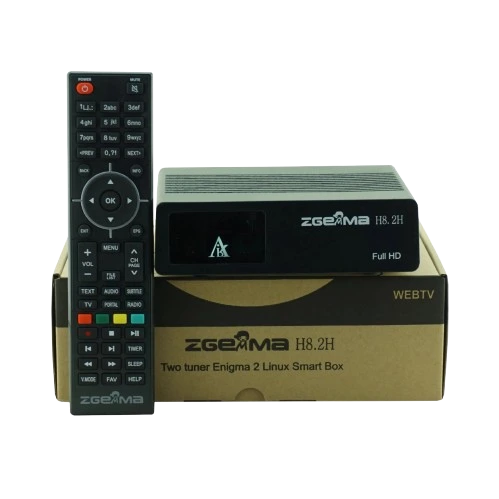
Enigma2 Works Differently from a Smart TV
Enigma2 is a Linux-based receiver platform used by boxes such as Zgemma, Dreambox, Vu+, Octagon and other compatible receivers.
Instead of downloading a normal Smart TV app, Enigma2 typically uses plugins that integrate IPTV playback directly into the receiver.
Linux-Based Receiver
Enigma2 uses a Linux firmware image rather than Android, Roku OS or webOS.
Plugins Handle IPTV
Compatible Enigma2 plugins can connect to Xtream-style IPTV accounts.
Box IP May Be Needed
The local IP address is useful when accessing or managing the box from another device.
XStreamity
XStreamity is an Enigma2 plugin designed specifically for Xtream Codes IPTV playlists.

XStreamity
XStreamity allows you to add an Xtream-style account directly on an Enigma2 receiver using your server information, username and password.
The plugin itself does not include any channels. Your Xtreme HD IPTV login information is supplied separately after purchasing a subscription.
View Setup InstructionsEnigma2 Setup at a Glance
Connect the Box
Put your Enigma2 receiver online.
Find Its IP
Note the receiver's local network address.
Open XStreamity
Install or launch the IPTV plugin.
Add Your Login
Enter server, username and password.
Find Your Enigma2 Box IP Address
Your receiver's local IP address can be useful when managing the device from another computer, installing plugins manually, or accessing its network interface.
How to Get XStreamity
Installation options vary depending on which Enigma2 firmware image your receiver uses.
Set Up Xtreme HD IPTV in XStreamity
Once XStreamity is installed, connecting your subscription is much simpler.
Connect Your Enigma2 Receiver
Make sure the box is connected to your television and has a working Ethernet or Wi-Fi internet connection.
Find the Receiver IP Address
Open the Network section of your Enigma2 image and note the current local IP address.
Install XStreamity if Needed
Check your Enigma2 plugin browser for XStreamity. Install the plugin if it is available.
If your firmware does not offer it through the plugin feed, installation can be performed manually using the correct package for your Enigma2 image.
Open XStreamity
Open your Enigma2 Plugins menu and launch XStreamity.
Add a New Playlist
Choose the option to add a new Xtream Codes playlist or server.
Select HTTP or HTTPS
Choose the protocol matching the server URL provided with your subscription.
Enter Your Server Details
Enter the Xtreme HD IPTV server or portal information supplied with your account.
Port: Only if included in your server address
Enter Username and Password
Enter your subscription username and password exactly as provided.
Password: Your subscription password
Save the Playlist
Save the account. XStreamity will validate the connection and add the playlist if the credentials are correct.
Load Xtreme HD IPTV
Open the newly added Xtreme HD IPTV playlist and allow XStreamity to retrieve the available categories and account information.
Enigma2 Setup Tips
Enigma2 images differ
OpenATV, OpenPLI, OpenViX, DreamOS and other Enigma2 distributions can have different menus, plugin feeds and package formats.
XStreamity uses Xtream
XStreamity is designed for Xtream Codes-style playlists rather than ordinary standalone M3U collections.
IP address is local
An address such as 192.168.1.105 is the receiver's private address on your home network. It is not your IPTV portal URL.
Plugin does not include channels
XStreamity is only the player. Your subscription information is provided separately after purchase.
Xtreme HD IPTV Enigma2 Questions
Common questions about setting up IPTV on an Enigma2 receiver.
What is the recommended IPTV app for Enigma2?
Which Enigma2 boxes can use this setup?
What credentials does XStreamity need?
Where do I find my Enigma2 IP address?
Is the Enigma2 IP address the same as the portal URL?
Can I use M3U on Enigma2?
Why doesn't XStreamity accept my account?
Does XStreamity provide IPTV channels?
Setting Up Another Device?
Explore setup instructions for Firestick, Android TV, Samsung TV, LG TV, Roku, Formuler Box, MAG Box, Enigma2, Apple devices, Windows and Mac.
View All App Guides