
How to Set Up Xtreme HD IPTV on iPhone, iPad & Apple TV
Learn how to use Xtreme HD IPTV on Apple devices with IPTVX. This guide covers iPhone, iPad and Apple TV setup using your Xtreme HD IPTV username, password and portal URL, or your M3U playlist URL.

Use IPTVX with Xtreme HD IPTV
Our recommended IPTV player for iPhone, iPad and Apple TV is IPTVX.
IPTVX supports Xtream-style account login as well as M3U playlists, making it easy to connect your Xtreme HD IPTV subscription to your Apple device.
Your login details are provided to you after purchasing an Xtreme HD IPTV subscription.
Supported Apple Devices
You can use the same general IPTVX setup process across your compatible Apple devices.
iPhone
Install IPTVX from the App Store and connect your Xtreme HD IPTV subscription directly on your iPhone.
iPad
Use IPTVX on your iPad for a larger-screen mobile viewing experience with the same subscription details.
Apple TV
Install IPTVX directly from the Apple TV App Store and use your remote to browse your subscription on your TV.
IPTVX on Apple TV
IPTVX provides a TV-oriented interface for browsing your live TV, movies and series on Apple TV.
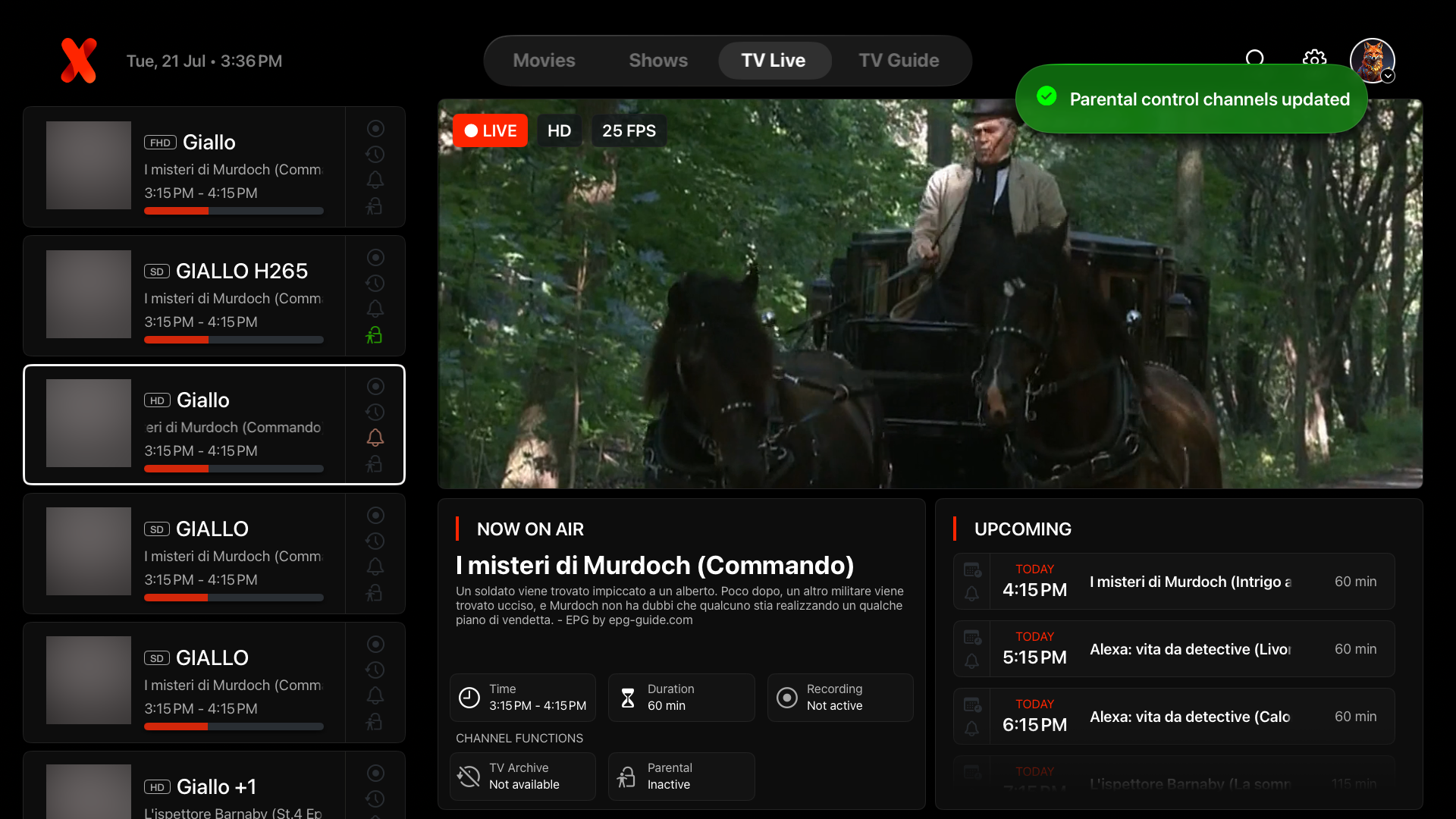
2 Ways to Connect Xtreme HD IPTV to IPTVX
Your subscription credentials are supplied after purchase. You can connect using Xtream/portal credentials or your M3U URL.
Xtream / Portal Login
Use the individual account credentials supplied with your Xtreme HD IPTV subscription.
M3U Playlist URL
You can also connect IPTVX by adding the unique M3U playlist URL provided with your subscription.
How to Install Xtreme HD IPTV with IPTVX
Follow these steps on your iPhone, iPad or Apple TV.
Open the App Store
Open the Apple App Store on your iPhone, iPad or Apple TV.
Search for:
Install IPTVX
Select IPTVX from the search results and install the application on your device.
Once installation is complete, open IPTVX.
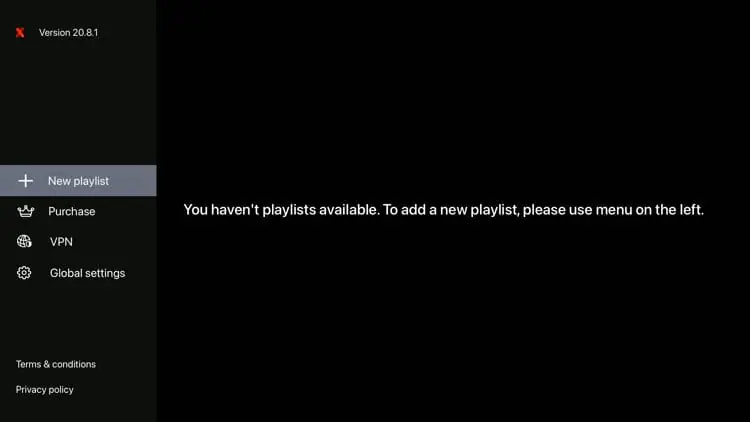
Select Add New Playlist
From the IPTVX setup screen, choose the option to add a new playlist.
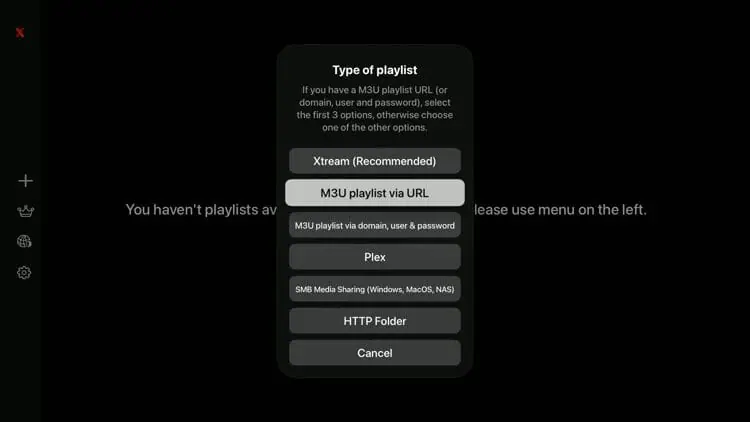
Choose Your Login Method
IPTVX will display different methods for connecting your playlist.
For Xtreme HD IPTV, use either:
or
M3U URL
Option A: Enter Your Xtream Credentials
If you choose the Xtream or portal login option, enter the credentials provided with your Xtreme HD IPTV subscription.
Password: Your subscription password
Server / Portal URL: The URL provided with your subscription
Option B: Add Your M3U URL
If you prefer the M3U method, select the M3U playlist option.
Give the playlist a recognizable name such as:
Then paste the M3U URL provided with your subscription.
Save the Playlist
Confirm the information and allow IPTVX to connect to your subscription.
IPTVX will begin loading the available playlist information.
Start Using Xtreme HD IPTV
Once the playlist has finished loading, you can browse the content available with your Xtreme HD IPTV subscription directly from IPTVX.
Xtreme HD IPTV Is Ready on Your Apple Device
Once your account is connected successfully, IPTVX provides an Apple-friendly interface for navigating the content available with your subscription.
- Browse available live TV channels
- Browse movies and on-demand content
- Access available TV series
- Use search and favorites
- Use the TV guide where supported
- Use the app on iPhone, iPad or Apple TV
Important Information About IPTVX
IPTVX is the player application used to connect and display your subscription on compatible Apple devices.
IPTVX Is a Player
IPTVX does not provide your Xtreme HD IPTV subscription. You connect your own subscription credentials to the app.
Credentials Are Provided After Purchase
Your username, password, portal URL or M3U URL are sent to you as part of your Xtreme HD IPTV subscription setup.
Keep Your Login Private
Do not publish or share your M3U URL, username, password or portal address publicly.
Xtreme HD IPTV iPhone, iPad & Apple TV FAQ
Common questions about setting up Xtreme HD IPTV on Apple devices using IPTVX.
What is the recommended IPTV app for iPhone?
What is the recommended IPTV app for Apple TV?
Can I use Xtreme HD IPTV on iPad?
What login information do I need for IPTVX?
Where do I get my portal URL or M3U URL?
Should I use Xtream login or M3U in IPTVX?
Does IPTVX provide IPTV channels?
Can I use the same IPTVX app on iPhone and Apple TV?
Using Another Device?
Visit the Xtreme HD IPTV App center for installation instructions for Firestick, Android TV, Samsung Smart TV, LG Smart TV, Apple devices and other compatible platforms.
View All Xtreme HD IPTV App Guides