
One of the most common support questions received by IPTV providers is simple:
“Why can’t I login to Xtreme HD IPTV?”
Whether you are using the official Xtreme HD IPTV app, IPTV Smarters Pro, TiviMate, IBO Player, HOT IPTV, or another compatible IPTV player, login problems can happen from time to time.
The good news is that most login issues are easy to diagnose and resolve.
In fact, based on common IPTV support trends, the majority of login problems typically fall into one of the following categories:
- Incorrect username or password
- Incorrect portal URL
- Expired subscription
- ISP blocking
- VPN-related issues
- Outdated applications
- Device-specific problems
- Internet connection issues
- App cache corruption
- User configuration errors
This guide explains the most common causes of Xtreme HD IPTV login issues and provides proven solutions for every major IPTV application and device.
By the end of this article, you should be able to identify the source of your login problem and get back to streaming quickly.
Before You Start Troubleshooting
Before trying advanced solutions, gather the following information:
Your Login Credentials
Verify:
- Username
- Password
- Portal URL
Many login failures occur because users accidentally enter:
- Extra spaces
- Wrong capitalization
- Old portal URLs
- Incorrect passwords
Copying and pasting credentials directly from the original welcome email is usually recommended.
Verify Your Subscription Status
Another common cause of login failures is an expired subscription.
If your account has expired:
- Login may fail completely
- The app may display an authentication error
- The app may show an expired account message
- Live channels may stop loading
If you’re unsure about your subscription status, contact support through the official channels listed on XtremeHDIPTVs.io.
Cause #1: Incorrect Username or Password
This remains the number one login issue across all IPTV applications.
Even a single incorrect character can prevent authentication.
Common Mistakes
Users frequently:
- Confuse O and 0
- Confuse I and l
- Accidentally copy spaces
- Enter incomplete credentials
- Use outdated login details
Solution
Always copy credentials directly from your original account information.
Avoid manually typing them whenever possible.
If using a remote control on Firestick or Android TV, typing errors become much more common.
Cause #2: Incorrect Portal URL
The portal URL is the server address used by your IPTV application.
If this address is incorrect, login will fail even if your username and password are correct.
Symptoms
You may see:
- Login Failed
- Authorization Failed
- Cannot Connect to Server
- Authentication Error
Solution
Verify the portal URL exactly as provided.
Common mistakes include:
- Adding https:// when not required
- Adding spaces
- Missing port numbers
- Using outdated URLs
Always use the latest portal information provided by the official Xtreme HD IPTV team.
Cause #3: Internet Connection Problems
Many users immediately assume there is a server issue when login fails.
However, internet connectivity issues are often responsible.
Check Your Connection
Run a speed test.
Recommended minimum speeds:
| Streaming Quality | Recommended Internet Speed | Best Use Case |
|---|---|---|
| SD (480p) | 5 Mbps | Basic live TV streaming |
| HD (720p) | 10 Mbps | Most live channels and sports |
| Full HD (1080p) | 15 Mbps | Movies, sports, and premium content |
| 4K UHD | 25 Mbps+ | Ultra HD streaming with maximum quality |
| Multiple Devices | 50 Mbps+ | Simultaneous streaming on several devices |
While login itself requires very little bandwidth, unstable internet can interrupt authentication requests.
Quick Fixes
- Restart your router
- Switch from Wi-Fi to Ethernet
- Reboot your device
- Test another internet connection
Cause #4: ISP Blocking
Some Internet Service Providers occasionally block or interfere with IPTV-related traffic.
Symptoms include:
- Login works on mobile data
- Login fails on home internet
- Login works with VPN
- Authentication requests time out
Solution
Test using:
- A VPN
- Mobile hotspot
- Different network
If login suddenly works, your ISP may be interfering with the connection.
Many users successfully resolve login issues by connecting through VPN servers located in:
- United States
- Canada
- Singapore
- United Kingdom
Cause #5: VPN Configuration Problems
Interestingly, VPNs can both solve and create IPTV login problems.
VPN Can Help
VPNs can bypass:
- ISP restrictions
- Routing problems
- Regional filtering
VPN Can Also Cause Problems
Some VPN servers:
- Are overloaded
- Have poor routing
- Trigger security protections
Solution
Try:
- Disabling VPN
- Switching VPN locations
- Connecting to another VPN provider
Many login issues disappear after changing VPN servers.
Xtreme HD IPTV App Login Problems
The official Xtreme HD IPTV Android and Firestick application provides one of the simplest login experiences.
However, users may still encounter occasional problems.
Common Issues
- App version outdated
- Corrupted cache
- Device storage full
- Login credentials incorrect
Solutions
- Force close the app.
- Clear cache.
- Restart device.
- Reinstall latest version.
- Verify credentials.
On Firestick:
Settings → Applications → Manage Installed Applications → Xtreme HD IPTV App → Clear Cache
This simple step resolves many login problems.
IPTV Smarters Pro Login Issues
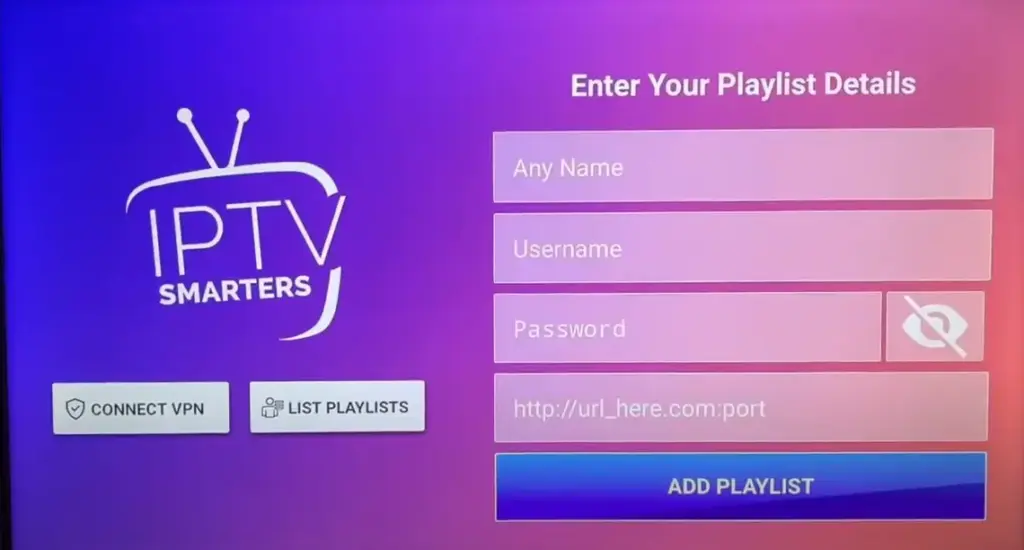
IPTV Smarters Pro remains one of the most popular IPTV applications.
Because it supports multiple login methods, configuration mistakes are common.
Most Common Smarters Problems
- Wrong login type selected
- Incorrect Xtream Codes credentials
- Wrong portal URL
- Expired subscription
Recommended Login Method
Use:
- Username
- Password
- Portal URL
rather than M3U playlists whenever possible.
This method is generally more reliable and easier to manage.
Smarters Fix Checklist
✓ Verify username
✓ Verify password
✓ Verify portal URL
✓ Update app
✓ Clear cache
✓ Restart app
In many cases, login issues disappear immediately after re-entering credentials carefully.
TiviMate Login Problems and Fixes
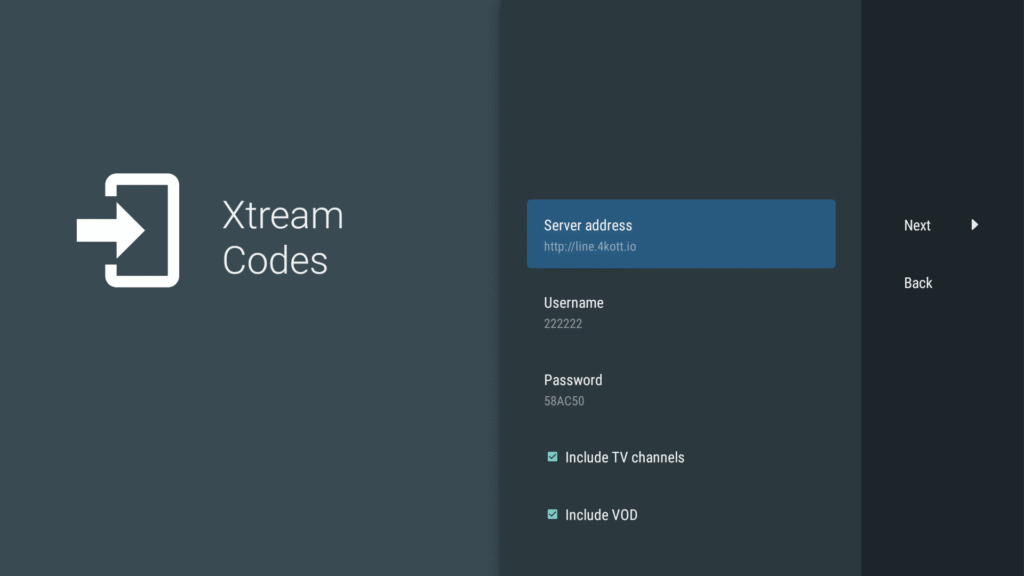
TiviMate has become one of the most popular IPTV applications among Android TV and Fire TV users.
Its modern interface, advanced EPG support, recording features, and multi-playlist management make it a favorite among experienced IPTV users.
However, because TiviMate offers multiple configuration options, users occasionally encounter login issues.
Common TiviMate Login Errors
Some of the most common issues include:
- Login failed
- Cannot connect to server
- Playlist processing failed
- Authorization error
- Failed to load channels
- EPG loading issues
Verify Your Xtream Codes Details
When adding Xtreme HD IPTV to TiviMate, ensure the following information is entered correctly:
- Server URL
- Username
- Password
Even one incorrect character can prevent successful authentication.
Re-Enter Credentials
If login suddenly stops working:
- Delete the playlist.
- Re-add the playlist.
- Enter credentials carefully.
- Save and reconnect.
Many users discover that a simple typo caused the issue.
Update TiviMate
Older versions of TiviMate occasionally experience compatibility issues.
To update:
- Download the latest version.
- Install over the existing version.
- Restart the device.
Clear App Cache
On Android TV or Firestick:
Settings → Apps → TiviMate → Clear Cache
Corrupted cache files can interfere with authentication.
Test Another App
If TiviMate fails but another application works, the issue is usually application-specific rather than account-related.
Try:
- IPTV Smarters Pro
- Xtreme HD IPTV App
- HOT IPTV
- IBO Player
If another app logs in successfully, focus troubleshooting on TiviMate itself.
IBO Player Login Problems and Fixes
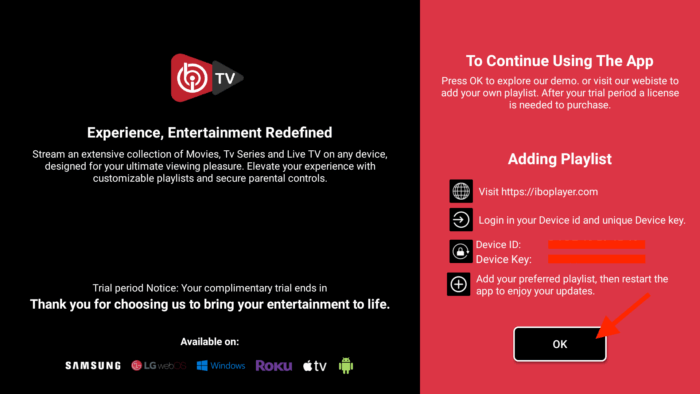
IBO Player has become increasingly popular among Smart TV users.
Many Samsung and LG television owners prefer it because it offers a clean interface and easy playlist management.
Common IBO Player Problems
Users may encounter:
- Playlist not loading
- Authentication failed
- MAC activation issues
- Portal connection errors
Verify Device Activation
Unlike some IPTV applications, IBO Player requires activation.
Before troubleshooting IPTV credentials, confirm:
- The app is activated
- Activation has not expired
- Device MAC address is correct
Verify Playlist Information
Many IBO login problems result from:
- Incorrect Xtream Codes data
- Incorrect M3U links
- Typing errors
Always double-check credentials before assuming there is a server issue.
Restart the Television
Smart TVs often run continuously for weeks or months.
A complete reboot can solve:
- Network issues
- Authentication problems
- Memory-related bugs
Power off the TV completely for 60 seconds before restarting.
HOT IPTV Login Problems and Fixes
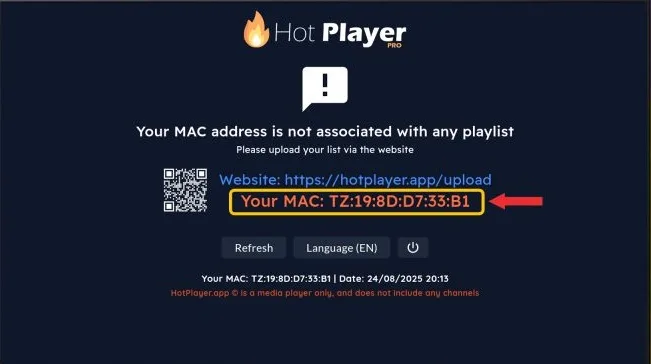
HOT IPTV is another popular IPTV player available on Smart TVs and Android devices.
Although generally reliable, users occasionally report login difficulties.
Common HOT IPTV Errors
- Cannot connect
- Login failed
- Invalid credentials
- Playlist unavailable
Refresh Your Playlist
Sometimes the application stores outdated information.
Try:
- Removing the playlist.
- Re-adding the playlist.
- Restarting the application.
Verify Network Connectivity
Many HOT IPTV login issues are actually network-related.
Test:
- Another website
- YouTube
- Netflix
If those services also fail, the issue may be your internet connection rather than IPTV authentication.
Try a Different DNS
Many users report improved reliability using:
- Google DNS
- Cloudflare DNS
Google DNS:
8.8.8.8
8.8.4.4
Cloudflare DNS:
1.1.1.1
1.0.0.1
DNS changes often help resolve routing problems.
Login Problems on Samsung Smart TVs
Samsung televisions are among the most common IPTV devices worldwide.
While generally reliable, they present unique troubleshooting challenges.
Common Samsung Issues
- App freezing
- Network errors
- Login failures
- Authentication issues
Restart Your TV Properly
Many users simply place the television into standby mode.
Instead:
- Turn off the television.
- Unplug it completely.
- Wait one minute.
- Reconnect power.
This clears temporary memory issues.
Check Date and Time
Incorrect date or time settings can occasionally interfere with secure authentication processes.
Verify:
Settings → General → Date & Time
Enable automatic synchronization whenever possible.
Login Problems on LG Smart TVs
LG televisions experience many of the same issues seen on Samsung devices.
Common Causes
- Outdated application versions
- Incorrect credentials
- Wi-Fi instability
- Memory limitations
Recommended Steps
- Update television software.
- Update IPTV application.
- Restart router.
- Verify credentials.
Most LG login problems are resolved using these basic steps.
Firestick Login Problems
Amazon Fire TV devices remain among the most popular IPTV streaming devices.
Because of their popularity, Firestick login questions are extremely common.
Common Firestick Login Errors
- Authentication failed
- Login timeout
- Cannot connect to server
- Playlist not loading
Restart Firestick
This solves more problems than most users realize.
Restart:
Settings → My Fire TV → Restart
Wait for the device to reboot completely.
Clear Cache
For IPTV applications:
Settings → Applications → Manage Installed Applications
Select:
- IPTV Smarters Pro
- TiviMate
- Xtreme HD IPTV App
- HOT IPTV
Then:
- Clear Cache
- Force Stop
Restart the application afterward.
Check Storage Space
Low storage can cause:
- App crashes
- Login issues
- Performance problems
Delete unused applications if storage is nearly full.
Android Phone and Android TV Login Problems
Android devices account for a significant percentage of IPTV users.
Because Android exists across many manufacturers, troubleshooting varies slightly.
Common Android Problems
- Corrupted app cache
- Battery optimization interference
- VPN conflicts
- Outdated software
Clear Cache and Data
Settings → Apps → IPTV App
Select:
- Clear Cache
- Clear Data
Then log in again.
Disable Battery Optimization
Some Android devices aggressively restrict applications.
This can interfere with:
- Server communication
- Authentication
- Background services
Disable battery optimization for IPTV applications if login issues persist.
Authentication Failed Errors Explained
Few error messages create more confusion than:
“Authentication Failed”
This message generally means:
- Username incorrect
- Password incorrect
- Portal URL incorrect
- Subscription inactive
- Server temporarily unavailable
First Steps
Whenever you see this error:
- Verify credentials.
- Verify portal URL.
- Test another application.
- Test another device.
This process quickly isolates the source of the problem.
Compare Multiple Apps
Example:
- Smarters fails
- TiviMate works
Result:
Account is valid.
Problem likely exists within Smarters configuration.
This simple comparison often saves significant troubleshooting time.
Understanding DNS-Related Login Problems
Many users never consider DNS when troubleshooting IPTV login issues.
However, DNS problems can prevent successful server connections.
What Is DNS?
DNS converts website and server names into IP addresses.
Without DNS:
Applications cannot locate servers properly.
Symptoms of DNS Problems
- Login timeouts
- Cannot connect to server
- Random connectivity issues
- Works on mobile data but not Wi-Fi
Recommended DNS Servers
Google DNS:
8.8.8.8
8.8.4.4
Cloudflare DNS:
1.1.1.1
1.0.0.1
Changing DNS often improves connectivity and reliability.
Advanced Troubleshooting Checklist
If basic troubleshooting fails, work through this checklist systematically.
Account Verification
✓ Username correct
✓ Password correct
✓ Subscription active
✓ Portal URL correct
Device Verification
✓ App updated
✓ Cache cleared
✓ Device restarted
✓ Internet working
Network Verification
✓ VPN tested
✓ Alternate DNS tested
✓ Mobile hotspot tested
✓ Router restarted
Application Verification
✓ Smarters tested
✓ TiviMate tested
✓ Xtreme HD IPTV App tested
✓ IBO Player tested
✓ HOT IPTV tested
Completing this checklist resolves the overwhelming majority of login issues reported by IPTV users.
Which IPTV App Is Best for Xtreme HD IPTV?
One of the most common questions users ask after resolving login issues is:
“Which IPTV app should I use?”
The answer depends on your device, experience level, and preferred features.
While Xtreme HD IPTV works with multiple IPTV players, some applications are better suited for specific users.
Official Xtreme HD IPTV App
Recommended for:
- New users
- Firestick users
- Android users
- Customers who want a simple setup
Advantages:
- Easy login process
- Designed specifically for Xtreme HD IPTV
- Simple interface
- Fast setup
- Minimal configuration
Potential drawbacks:
- Fewer advanced customization options than TiviMate
IPTV Smarters Pro
Recommended for:
- Beginners
- Families
- Users who want a simple interface
Advantages:
- Easy Xtream Codes login
- Multi-screen support
- User-friendly design
- Available on many devices
Potential drawbacks:
- Can become slower on older devices
- Limited advanced customization
TiviMate
Recommended for:
- Advanced users
- Android TV users
- Fire TV users
Advantages:
- Excellent interface
- Advanced EPG support
- Recording features
- Playlist management
- High performance
Potential drawbacks:
- More complex setup
- Additional premium features require purchase
IBO Player
Recommended for:
- Samsung Smart TV users
- LG Smart TV users
Advantages:
- Excellent Smart TV support
- Modern interface
- Stable playback
Potential drawbacks:
- Requires activation
- Less flexibility than Android-based apps
HOT IPTV
Recommended for:
- Smart TV users
- Users who prefer portal-based setup
Advantages:
- Lightweight
- Easy setup
- Good Smart TV support
Potential drawbacks:
- Fewer advanced features
Recommended App Comparison
| IPTV App | Ease of Use | Features | Best For |
|---|---|---|---|
| Xtreme HD IPTV App | ★★★★★ Excellent | ★★★★☆ Good | New users, Android, Firestick |
| IPTV Smarters Pro | ★★★★★ Excellent | ★★★★☆ Good | Most users, families, beginners |
| TiviMate | ★★★☆☆ Moderate | ★★★★★ Excellent | Power users, Android TV, Fire TV |
| IBO Player | ★★★★☆ Good | ★★★★☆ Good | Samsung & LG Smart TVs |
| HOT IPTV | ★★★★☆ Good | ★★★☆☆ Moderate | Smart TV users |
What Causes Most IPTV Login Problems?
After reviewing common IPTV support requests across the industry, several patterns emerge.
The majority of login problems do not originate from server failures.
Instead, they typically involve user-side configuration issues.
Estimated Distribution of Login Problems
| Cause of Login Problem | Estimated Frequency |
|---|---|
| Incorrect Username or Password | 35% |
| Incorrect Portal URL | 20% |
| Expired Subscription | 15% |
| ISP Restrictions | 10% |
| App Configuration Errors | 8% |
| Cache or Device Issues | 5% |
| VPN Configuration Problems | 4% |
| Server Maintenance or Outages | 3% |
When Should You Contact Support?
Many users contact support immediately after encountering a login issue.
However, performing basic troubleshooting first can save significant time.
Contact Support If:
- Credentials are verified
- Portal URL is verified
- Subscription is active
- Multiple apps fail
- Multiple devices fail
- VPN testing does not help
- DNS changes do not help
At that point, support can investigate account-specific issues more effectively.
Information to Provide
When contacting support, include:
- Device type
- Application name
- Screenshot of error
- Username (if requested securely)
- Description of the issue
Providing complete information usually speeds up troubleshooting.
Preventing Future Login Problems
Many login issues can be avoided entirely.
Save Your Credentials
Store:
- Username
- Password
- Portal URL
in a secure location.
This prevents problems when changing devices.
Bookmark Official Resources
Always use official support resources and setup guides.
This reduces the risk of using outdated information.
Keep Apps Updated
Regular updates provide:
- Bug fixes
- Security improvements
- Better compatibility
- Improved stability
Restart Devices Occasionally
Many streaming devices run continuously.
A periodic restart helps maintain performance and stability.
Frequently Asked Questions
Why can’t I login to Xtreme HD IPTV?
Most login issues are caused by incorrect credentials, incorrect portal URLs, expired subscriptions, or network-related problems.
What should I check first?
Verify:
- Username
- Password
- Portal URL
These three items account for most login failures.
Why does my app say “Authentication Failed”?
This usually indicates:
- Incorrect credentials
- Incorrect portal URL
- Inactive subscription
Can a VPN fix login problems?
Yes.
If your ISP is interfering with IPTV traffic, a VPN may resolve the issue.
Can a VPN cause login problems?
Also yes.
Some VPN servers may create routing issues.
Try switching servers or disabling the VPN temporarily.
Which app works best with Xtreme HD IPTV?
Many users prefer:
- Xtreme HD IPTV App
- IPTV Smarters Pro
- TiviMate
The best option depends on your device and experience level.
Why does login work on one app but not another?
This usually indicates an application configuration issue rather than an account issue.
Why does login work on mobile data but not Wi-Fi?
This may indicate:
- ISP restrictions
- DNS problems
- Router configuration issues
Should I clear cache regularly?
Yes.
Clearing cache periodically can improve stability and resolve unexpected issues.
Why does login suddenly stop working after months?
Possible causes include:
- Subscription expiration
- App updates
- Portal changes
- Device issues
- Network changes
Is the official Xtreme HD IPTV app available for Firestick?
Yes.
The official app is designed to work on Android and Fire TV devices.
Can Smart TV users use Xtreme HD IPTV?
Yes.
Applications such as IBO Player and HOT IPTV are commonly used on Smart TVs.
Do I need a VPN?
Not necessarily.
Many users stream successfully without one.
However, a VPN can help in certain network environments.
How often are login issues caused by server problems?
Server issues account for only a small percentage of login-related support requests.
Most issues originate from device, app, or network configurations.
What should I do before contacting support?
Verify:
- Credentials
- Portal URL
- Internet connection
- VPN status
- App version
- Subscription status
Completing these checks resolves most login problems.
Final Thoughts
Login problems can be frustrating, especially when you’re ready to watch your favorite channels, movies, sports events, or television shows.
Fortunately, most Xtreme HD IPTV login issues are relatively simple to resolve.
The most common causes remain:
- Incorrect credentials
- Incorrect portal URLs
- Expired subscriptions
- ISP restrictions
- Application configuration problems
By following the troubleshooting steps in this guide, users can quickly identify the source of the problem and restore access to their service.
Whether you’re using the official Xtreme HD IPTV App, IPTV Smarters Pro, TiviMate, IBO Player, HOT IPTV, or another compatible application, the same troubleshooting principles apply.
Start with the basics.
Verify credentials.
Verify the portal URL.
Test another application.
Check your internet connection.
And work through the troubleshooting checklist systematically.
In most cases, you’ll be back to streaming in just a few minutes.