
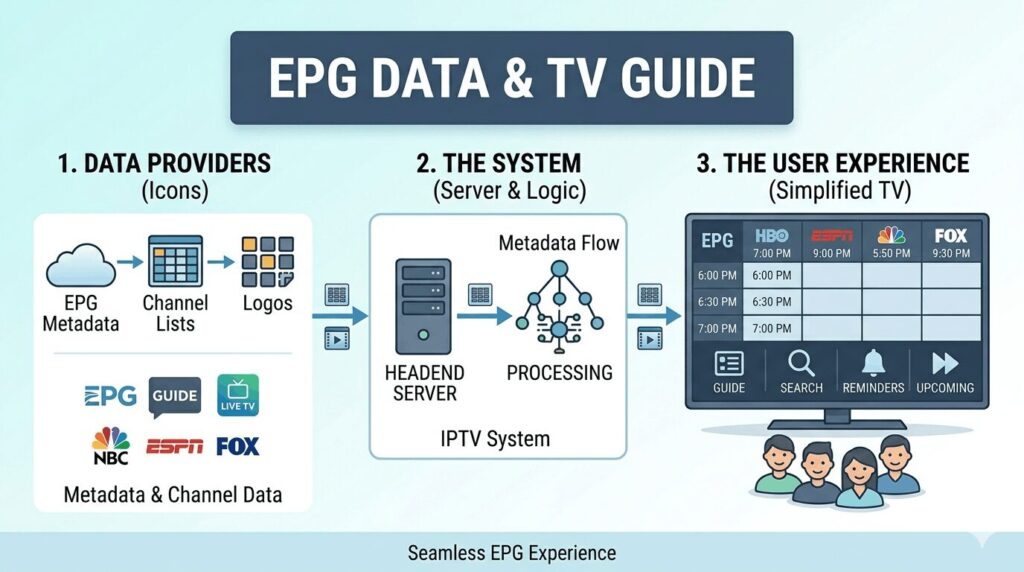
If you’ve ever opened an IPTV app and seen a schedule showing what is currently playing and what is coming next, you’ve already used an EPG.
Most IPTV users interact with EPG every day without thinking much about it.
The moment you browse channels, check what’s on later tonight, or search for a specific program, the EPG is doing the work behind the scenes.
Without EPG, IPTV becomes much harder to use.
Instead of seeing program names and schedules, you would only see channel names with no information about what is actually airing.
That’s why EPG has become one of the most important features in modern IPTV services.
In this guide, you’ll learn:
- What EPG means
- How IPTV EPG works
- Why EPG is important
- Types of EPG sources
- How to set up EPG
- Common EPG problems
- How to fix IPTV EPG issues
Let’s start with the basics.
What Is EPG in IPTV?
EPG stands for Electronic Program Guide.
In IPTV, an EPG provides a television guide that displays:
- Current programs
- Upcoming programs
- Channel schedules
- Program descriptions
- Start times
- End times
Think of it as the digital version of the old TV Guide magazines people used before the internet.
Instead of flipping through pages, the information appears directly inside your IPTV application.
Without EPG, users would have difficulty knowing:
- What’s currently playing
- What’s coming next
- When a sports event begins
- When a movie starts
- Which channels are showing specific content
EPG transforms a large channel list into an organized television experience.
What Does EPG Stand For?
EPG means:
Electronic Program Guide
Let’s break down each part.
Electronic
The guide is digital.
Information updates automatically through internet-based data sources.
Program
The guide displays television programs.
Examples include:
- Movies
- Sports events
- TV series
- News broadcasts
- Documentaries
Guide
The system helps viewers navigate content.
Instead of guessing what is on a channel, users can see complete schedules.
The result is a much better viewing experience.
How Does IPTV EPG Work?
Many people use EPG every day without understanding how it actually works.
The process is surprisingly simple.
Step 1: Program Data Is Created
Every television channel has a schedule.
For example:
This schedule becomes EPG data.
Step 2: EPG Data Is Stored
The information is stored on servers.
These servers maintain:
- Program names
- Descriptions
- Start times
- End times
- Categories
Step 3: IPTV App Downloads Data
When users launch an IPTV application such as:
- TiviMate
- IPTV Smarters Pro
- XCIPTV
- Hot IPTV
the app downloads EPG information.
Step 4: EPG Is Displayed
The IPTV player matches EPG data with channels.
Users then see:
- Current program
- Next program
- Full schedule
directly inside the application.
Why Is EPG Important?
Many beginners underestimate how important EPG actually is.
Once you experience IPTV with a good EPG, it’s difficult to go back.
Easier Channel Navigation
Imagine having 20,000 channels.
Without EPG:
- You click channels randomly.
- You don’t know what’s playing.
- You waste time browsing.
With EPG:
- You immediately know what each channel is showing.
The difference is enormous.
Better Sports Viewing
Sports fans rely heavily on EPG.
EPG helps answer questions like:
- What time does the game start?
- Which channel is showing the match?
- What comes after the game?
This is especially useful for:
- NFL
- NBA
- UFC
- Boxing
- Soccer
- Tennis
Improved User Experience
Modern viewers expect convenience.
EPG provides:
- Organization
- Searchability
- Better navigation
- Faster content discovery
This makes IPTV feel much more professional.
Recording Features
Some IPTV apps use EPG information for:
- Recording schedules
- Reminders
- Catch-up features
Without EPG, these functions become limited.
What Information Does an EPG Show?
Most IPTV guides display several pieces of information.
Typical EPG Information
Some advanced EPG systems also include:
- Ratings
- Genres
- Episode information
- Season information
- Program artwork
Types of IPTV EPG Sources
Not all EPG systems work the same way.
There are three major categories.
Provider EPG
This is the most common type.
The IPTV provider supplies:
- Channels
- EPG data
Everything is managed automatically.
Users often don’t need to configure anything.
Advantages:
- Easy setup
- Automatic updates
- Simple management
Disadvantages:
- Limited customization
XMLTV EPG
XMLTV is one of the most popular EPG formats.
An XMLTV file contains:
- Channel information
- Program schedules
- Program descriptions
Many IPTV applications support XMLTV integration.
Advantages:
- Flexible
- Widely supported
- Highly customizable
Disadvantages:
- Requires manual setup in some cases
Third-Party EPG Services
Some users prefer dedicated EPG providers.
These services specialize in:
- EPG creation
- EPG accuracy
- Program updates
Advantages:
- Better guide accuracy
- Expanded channel coverage
Disadvantages:
- Additional setup
- Sometimes additional costs
IPTV Apps With Excellent EPG Support
Not every IPTV app handles EPG equally well.
Some applications provide much better guide functionality.
IPTV App Comparison
TiviMate EPG Experience
TiviMate is often considered one of the best IPTV players for EPG functionality.
Features include:
- Grid-style TV guide
- Fast loading
- Category support
- Search functionality
- Multiple EPG sources
For many IPTV users, TiviMate provides the closest experience to traditional cable television guides.
IPTV Smarters Pro EPG Experience
IPTV Smarters Pro is another popular option.
Benefits include:
- Beginner-friendly design
- Simple navigation
- Automatic EPG integration
- Cross-platform support
It remains one of the most widely used IPTV applications.
Common EPG Problems
Even the best IPTV setup can occasionally experience EPG issues.
Common problems include:
- No EPG data
- Missing channel information
- Wrong program times
- Blank TV guide
- EPG not updating
Fortunately, most of these issues are easy to fix.
In the next section, we’ll cover step-by-step EPG setup instructions, troubleshooting methods, and solutions for the most common IPTV guide problems.
How to Set Up EPG on IPTV Apps
In most cases, EPG setup is straightforward.
Many IPTV providers automatically supply EPG information when users log in using:
- Xtream Codes
- Portal URL
- M3U Playlist with EPG URL
However, there are situations where manual setup is required.
Let’s look at the most popular IPTV applications.
How to Set Up EPG in TiviMate
TiviMate is one of the most powerful IPTV players available today.
Its EPG support is excellent.
Automatic EPG Setup
If your IPTV provider includes EPG data:
- Open TiviMate
- Add your playlist
- Enter Xtream Codes credentials
- Allow channels to load
- Wait for EPG download
Most providers configure everything automatically.
Manual EPG Setup
If no guide appears:
- Open Settings
- Select EPG
- Choose Add EPG Source
- Enter XMLTV URL
- Save settings
- Update EPG
TiviMate will download guide information and match channels.
Refreshing EPG in TiviMate
To manually refresh:
- Open Settings
- Select EPG
- Choose Update EPG
This forces the app to download the latest guide data.
How to Set Up EPG in IPTV Smarters Pro
IPTV Smarters Pro is popular because of its simplicity.
Most users never need manual EPG configuration.
Automatic Setup
When logging in through:
- Xtream Codes API
- Portal login
EPG data usually loads automatically.
Manual Refresh
If EPG appears blank:
- Open IPTV Smarters Pro
- Go to Settings
- Refresh Channels
- Refresh EPG
The application will attempt to download fresh guide information.
Common Smarters EPG Fix
Many EPG problems in IPTV Smarters are caused by:
- Outdated app versions
- Corrupted cache
- Provider-side guide issues
Updating the application often resolves problems.
How to Set Up EPG in XCIPTV
XCIPTV also supports robust EPG functionality.
Setup is generally automatic.
Manual Update Process
- Open XCIPTV
- Navigate to Settings
- Select EPG Update
- Download latest guide
Many users schedule automatic updates daily.
How to Set Up EPG Using XMLTV
XMLTV remains one of the most widely supported EPG formats.
Many IPTV services provide an XMLTV URL.
The setup process is usually:
- Obtain XMLTV URL
- Open IPTV player settings
- Locate EPG section
- Add XMLTV source
- Download guide
After downloading, channels are matched to guide data.
Why Is My IPTV EPG Not Working?
This is one of the most searched IPTV questions online.
Several issues can prevent EPG from loading.
Problem #1: Incorrect EPG URL
This is perhaps the most common cause.
If the XMLTV URL is:
- Misspelled
- Incomplete
- Expired
the application cannot retrieve guide information.
Solution
Verify:
- URL spelling
- Provider information
- XMLTV source status
Problem #2: EPG Not Updated
Sometimes guide information simply becomes outdated.
Applications cache EPG data to improve performance.
Unfortunately, cached information can become stale.
Solution
Force a manual EPG refresh.
Most IPTV apps include an Update EPG button.
Problem #3: Incorrect Time Zone
A surprisingly common issue.
Symptoms include:
- Programs showing incorrect times
- Sports events appearing hours early
- Empty current-program slots
Solution
Verify:
- Device timezone
- IPTV app timezone
- Provider timezone settings
Incorrect timezone settings frequently cause guide problems.
Problem #4: Missing Channel Mapping
Sometimes channels load correctly but show no guide information.
This often happens when:
- Channel names change
- Provider updates channel IDs
- EPG mappings break
Solution
Reload playlist and EPG data.
Many IPTV apps allow remapping channels manually.
Problem #5: Corrupted Cache
Apps occasionally store corrupted guide data.
Symptoms:
- Blank EPG
- Missing channels
- Incomplete schedules
Solution
Clear application cache.
Restart application.
Download guide again.
Problem #6: Provider-Side Issues
Not every EPG problem originates on your device.
Sometimes:
- Servers fail
- EPG databases become unavailable
- Guide updates stop temporarily
Solution
Contact provider support.
If multiple users experience the same issue, the problem is often server-side.
Common IPTV EPG Problems and Fixes
How Often Does IPTV EPG Update?
Update frequency depends on:
- IPTV provider
- Application settings
- EPG source
Typical update intervals include:
Most users never need to manually update EPG unless problems occur.
IPTV EPG vs Traditional TV Guide
Many younger viewers have never used traditional television guides.
Older cable systems provided:
- Printed schedules
- On-screen channel guides
EPG serves the same purpose.
However, IPTV EPG systems are often more powerful.
Traditional TV Guide
Typically displayed:
- Current show
- Next show
That’s it.
IPTV EPG
Can display:
- Full schedules
- Multiple days of programming
- Search functions
- Categories
- Recording options
- Program descriptions
Modern IPTV EPG systems offer significantly more functionality.
Advanced EPG Features
Premium IPTV apps often include advanced features.
Search by Program Name
Instead of browsing channels manually, users can search for:
- Movies
- TV series
- Sports events
The guide finds matching broadcasts instantly.
Favorites Integration
Many applications allow:
- Favorite channels
- Custom categories
This makes navigation faster.
Recording Integration
Some IPTV apps use EPG information for DVR functions.
Users can schedule recordings based on guide data.
Reminder Features
Some applications allow:
- Event reminders
- Sports reminders
- Program alerts
This prevents users from missing broadcasts.
Multi-Day Program Schedules
Premium EPG implementations often provide:
- 24-hour schedules
- 7-day schedules
- Extended guide information
This makes planning easier.
Best IPTV Apps for EPG
Not all IPTV apps provide the same experience.
Recommended Ranking
TiviMate remains the favorite among many experienced IPTV users because of its powerful guide functionality.
Tips for Maintaining a Healthy EPG
To minimize problems:
Update Apps Regularly
Outdated apps often create EPG compatibility issues.
Refresh Guide Weekly
Manual updates help maintain accuracy.
Verify Timezone Settings
Many guide problems originate from timezone mismatches.
Use Reliable EPG Sources
Quality guide data improves the entire viewing experience.
Clear Cache Occasionally
This removes corrupted data that may interfere with guide updates.
Frequently Asked Questions
What does EPG mean in IPTV?
EPG stands for Electronic Program Guide.
It displays channel schedules, current programs, and upcoming broadcasts.
Does IPTV need EPG?
Technically no.
However, IPTV becomes much easier to use with EPG.
Most users consider it essential.
What is XMLTV?
XMLTV is a popular file format used to deliver EPG information to IPTV applications.
Why is my IPTV EPG blank?
Common causes include:
- Incorrect URL
- Server issues
- Corrupted cache
- Missing channel mappings
How do I refresh IPTV EPG?
Most applications include:
- Update EPG
- Refresh Guide
- Reload EPG
inside settings.
Which IPTV app has the best EPG?
Many users consider TiviMate to offer the strongest EPG experience due to its speed, layout, and customization options.
How often should EPG update?
Most IPTV services update guide information daily.
Automatic updates usually occur every 12 to 24 hours.
Can EPG show future programs?
Yes.
Most IPTV guides display several days of upcoming schedules.
Final Thoughts
EPG is one of the most important features in modern IPTV systems.
Without it, users would struggle to navigate thousands of channels and discover content efficiently.
An Electronic Program Guide transforms IPTV from a simple channel list into a complete television experience by providing schedules, program descriptions, current broadcasts, and upcoming content information.
Whether you’re using TiviMate, IPTV Smarters Pro, XCIPTV, Hot IPTV, or another IPTV player, a properly configured EPG makes watching television easier, faster, and far more enjoyable.
For most IPTV users, a good EPG is no longer a luxury feature—it’s an essential part of the viewing experience. Understanding how it works, how to set it up, and how to troubleshoot common issues will help you get the most from any IPTV service.